Prefix.dev logoPrefix.dev logo
Channels
Paxton with wand and angel wings on starry night sky background
Pixi
How to manage dependencies
Rattler Build
How to build conda packages
Rattler API
Rust + Python Bindings
Channels
How to host your own packages
GraphQL API
How to use our GraphQL API
API Keys
Set your own API keys
Go to Overview
Paxton with wand and angel wings on starry night sky background
pixi
Our Open Source Software Package Manager
rattler-build
The fast package build tool
rattler
Low-level Rust & Python libraries to create conda environments quickly
Prefix.dev
Browse packages & Host your own
Blog
Pricing
Sign in
0
Paxton with wand and angel wings on starry night sky background
Pixi
How to manage dependencies
Rattler Build
How to build conda packages
Rattler API
Rust + Python Bindings
Channels
How to host your own packages
GraphQL API
How to use our GraphQL API
API Keys
Set your own API keys
Go to Overview
Paxton with wand and angel wings on starry night sky background
pixi
Our Open Source Software Package Manager
rattler-build
The fast package build tool
rattler
Low-level Rust & Python libraries to create conda environments quickly
Prefix.dev
Browse packages & Host your own
0

Prefix.dev

  • prefix
  • Overview
  • Browse packages
  • API and API Keys
  • GraphQL API
  • Channels
  • Pixi
  • Documentation
  • Repository
  • rattler-build
  • Documentation
  • Repository
  • rattler
  • Rust API
  • Python API
  • Repository

Package browsingLearn how to navigate the prefix.dev to find the packages you need.

Visit our dashboard and use the search bar to locate all available packages on our website. As you type, a list of packages within their respective channels will appear. Click on the channel name to navigate to the channel or select the entire cell to access the latest version of the package.

Search packages in the dashboardSearch packages in the dashboard

Useful links

When visiting a package page, you can explore various URLs:

  • Feedstock: The repository containing the package recipe. Useful for understanding the process through which the package is generated.
  • Home: The package's homepage, as defined in the recipe.
  • Documentation: The package's documentation page, as defined in the recipe.
  • Feedstock Pull Requests: View any open pull requests for the package's feedstock.

The package's variants

A package may have multiple versions, and each version can have different builds and builds for various operating systems. The Package Variant table provides a helpful overview.

Clicking on an entry in the table expands the list of dependencies for that package variant.
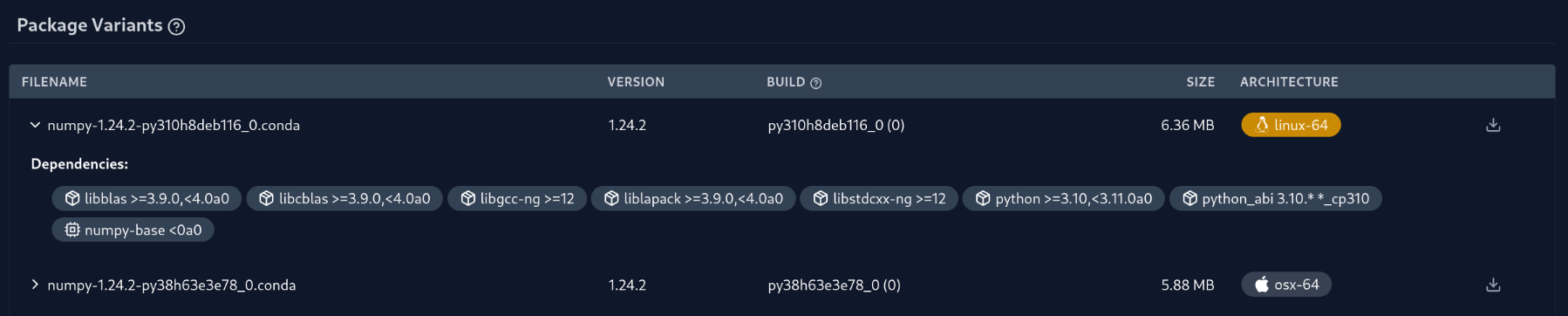
Numpy package variantNumpy package variant

Hover over the listed dependencies to obtain more information on the items. If there are repodata patches, they will also be displayed in the Package Variant table.

Common patches found in the table:

  • Yanked: The package is removed from the repodata, but the download link remains accessible. The package can only be used by linking to it directly.
  • Removed dependencies: Visualized as red pills in the dependency list. These dependencies are removed from the repodata after the package was built.
  • Added dependencies: Visualized as green pills in the dependency list. These dependencies are added to the repodata after the package was built.


    Numpy package variantNumpy package variant

Previous Chapter

Overview

Next Chapter

API and API Keys
Package browsing
  • Useful links
  • The package's variants
Tools
pixi open source package managerrattler-build a conda package builder in Rustrattler Rust crates to work with condamamba a cross-platform package managerquetz host packages easily
Company
TeamImprintContact us
Docs
OverviewBrowse packagesAPI and API KeysGraphQL API
BlogChannelsReport Issues
Prefix.dev logoPrefix.dev logo
© Prefix.dev GmbH All rights reserved.
Terms of ServicePrivacy Policy
Prefix.dev logoPrefix.dev logo
All systems operational